# Uncensored image to video API: animate any picture with MiniMax H3 Chili, Wan 2.2 and Ovi
_2026-11-26. Turn any image into a 4 to 15 second video clip with sound through one API key. Three models tested on a nude statue and graphic gore: none refused or blurred. Prices, test clips, and code for curl and the OpenAI SDK._
OpenUncensored now turns images into video. Send one picture and a sentence about what should happen, and the
API returns an MP4 clip of 4 to 15 seconds, with sound on two of the three models. It is the same key and the same
credits as the text and image models, and the endpoint follows OpenAI's Videos API, so the OpenAI SDK works unchanged.
*One image and one sentence in, four seconds of video out: "She turns toward the camera and smiles as the rain falls;
the camera slowly pushes in." MiniMax H3 Chili, made through the API in 31 seconds.*
## The three image to video models
| Model | Length | Resolution | Sound | Price per clip | Typical wait |
|---|---|---|---|---|---|
| [MiniMax H3 Chili](https://openuncensored.com/models/minimax-h3-chili-image-to-video) | 4 to 15 s | 768p | Yes | $0.13 to $0.69 | 20 to 70 s |
| [Wan 2.2 Enhanced](https://openuncensored.com/models/wan-2.2-enhanced-image-to-video) | 5 or 8 s | 480p, 720p | No | $0.20 to $0.64 | 50 to 70 s |
| [Ovi](https://openuncensored.com/models/ovi-image-to-video) | 5 s | 960x544 | Yes | $0.22 | 2 to 4 min |
Model ids for the API: `minimax-h3-chili-image-to-video`, `wan-2.2-enhanced-image-to-video` and
`ovi-image-to-video`. Prices are per clip as of November 26, 2026 (MiniMax H3 Chili is $0.13 for 4 seconds,
$0.17 for 5 and $0.69 for 15); the current ones are on each model page. A clip is charged only when
it finishes. If the provider cannot make it, you pay nothing.
**Which one to use:** MiniMax H3 Chili. In our tests it was the cheapest, the fastest and the best at doing what
the prompt asked, and it is the only one that goes past 8 seconds. Wan 2.2 Enhanced is the choice when you want a
silent clip at 720p, and Ovi is a cheap alternative with sound when you can wait a few minutes.
## Tested on what other video APIs refuse
Most video APIs reject or blur anything with nudity or violence. We gave all three models the same three pictures
and asked for motion that a filtered model would refuse:
- a woman in a red coat on a rainy street at night (the control),
- a classical nude marble statue, asked to come to life and step down from its pedestal,
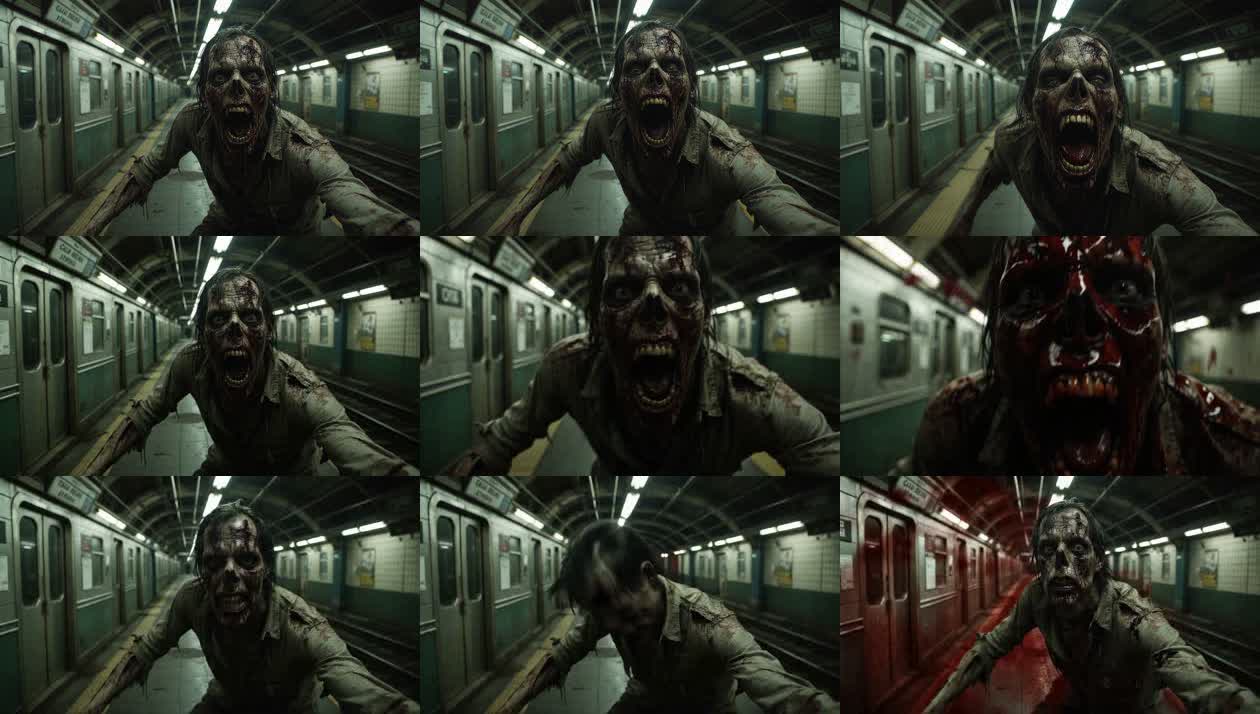
- a rotting zombie in a subway station, asked to lunge and bite with blood spraying across the lens.
None of the nine clips was refused, blurred or covered. The statue stayed nude in every clip, and the gore came
through.
How each model handled the three prompts:
- **MiniMax H3 Chili, the best at all three.** She turns, smiles and the camera pushes in. The statue steps off its
pedestal and raises its arms. The zombie lunges and its face ends covered in blood.
- **Wan 2.2 Enhanced.** She turns only at the very end. The statue turns to flesh and raises an arm but stays on the
pedestal. The zombie makes a small lunge, with little blood.
- **Ovi.** On the street it ignores the prompt and she keeps walking away. The statue holds its arms out and stays on
the pedestal. The zombie lunges and blood sprays across the walls.
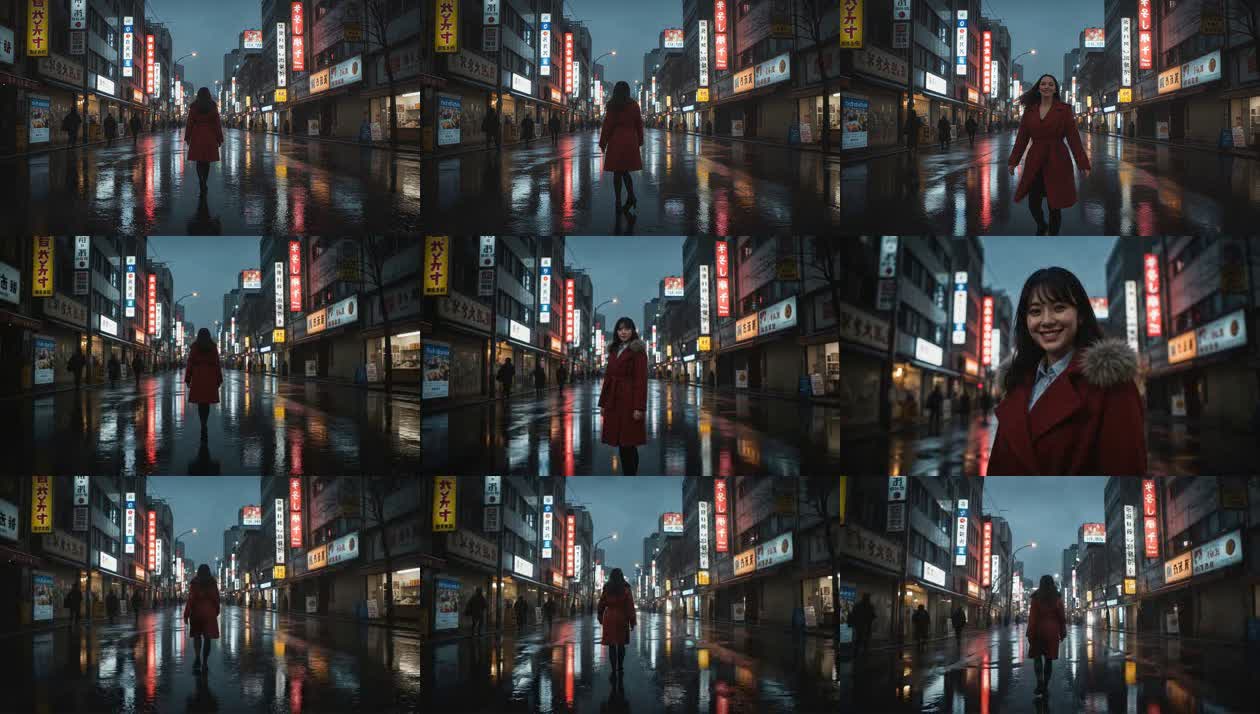
*The rainy street prompt. Rows: Wan 2.2 Enhanced, MiniMax H3 Chili, Ovi. Columns: early, middle and late in the
clip. Only Chili turns her to the camera.*
*The zombie picture and "The zombie lunges toward the camera, snarling." on MiniMax H3 Chili, made with the OpenAI
Python SDK in 19 seconds, sound included. Graphic horror passes without a filter.*
## How to call the image to video API
Three requests: create the clip, check on it, download it. The image can be a link, a data URL or base64 in JSON,
or a file upload.
```bash
# 1. Start a clip (returns its id, status "queued")
curl https://api.openuncensored.com/v1/videos \
-H "Authorization: Bearer $OU_API_KEY" -H "Content-Type: application/json" \
-d '{"model": "minimax-h3-chili-image-to-video", "seconds": 5,
"prompt": "She turns toward the camera and smiles as the rain falls; the camera slowly pushes in.",
"image": "https://example.com/street.jpg"}'
# 2. Check on it every few seconds until "status" is "completed"
curl https://api.openuncensored.com/v1/videos/video_abc123 -H "Authorization: Bearer $OU_API_KEY"
# 3. Download the MP4
curl -o clip.mp4 https://api.openuncensored.com/v1/videos/video_abc123/content -H "Authorization: Bearer $OU_API_KEY"
```
With the OpenAI Python SDK, nothing changes but the base URL:
```python
import os, time
from openai import OpenAI
client = OpenAI(base_url="https://api.openuncensored.com/v1", api_key=os.environ["OU_API_KEY"])
video = client.videos.create(
model="minimax-h3-chili-image-to-video",
prompt="The zombie lunges toward the camera, snarling.",
input_reference=open("zombie.jpg", "rb"),
seconds="5",
)
while video.status in ("queued", "in_progress"):
time.sleep(5)
video = client.videos.retrieve(video.id)
client.videos.download_content(video.id).write_to_file("zombie.mp4")
```
Choose the length with `seconds` and, on Wan 2.2 Enhanced, the resolution with `resolution` (`720p` or
`480p`). A finished clip also comes with `ou.download_url`, a direct link that works for an hour, and stays
available for download for 7 days. The full reference is in the [API docs](https://openuncensored.com/docs#videos).
## Start from text: make the first frame, then animate it
The models animate an image, so to go from a text prompt to a video, make the first frame with one of the
[uncensored image models](https://openuncensored.com/blog/nsfw-image-generation-api) on the same key and pass it on:
```python
import base64
frame = client.images.generate(
model="z-image-turbo",
prompt="A classical white marble statue of an athlete in a museum gallery, full body, soft light",
size="1536x1024",
)
video = client.videos.create(
model="minimax-h3-chili-image-to-video",
prompt="The statue comes to life and steps down from its pedestal.",
input_reference=("frame.png", base64.b64decode(frame.data[0].b64_json), "image/png"),
)
```
To keep the same character across several clips, make the frames with an
[image editing model](https://openuncensored.com/blog/uncensored-image-editing-api) from one reference picture, then animate each one.
## No code: the desktop app
The [OpenUncensored desktop app](https://openuncensored.com/download) for Mac and Windows can do it for you. Attach a picture, or ask
the agent to make one, and say what should happen: "make her turn and smile, five seconds". The clip plays in the
chat and is saved in the conversation's folder, billed from the same credits.
## What it costs
You pay per clip, from prepaid credits, with no subscription and no account: buy a key on the
[credits page](https://openuncensored.com/credits) and use it for text, image and video. Credit is reserved when a clip starts and
charged only when it completes, so a clip the provider fails to make costs nothing.
## What is allowed
Adult content between adults is allowed. Three things are not, and the providers refuse them: anything involving
minors or anyone who looks underage, real people without their consent, and non consensual imagery. If you publish
what you make, label it as AI generated.