You can now edit images through the OpenUncensored API, with uncensored models. Send one or more reference pictures and an instruction, and the model draws a new image that keeps them: the same character, face, hair and outfit, in a new scene, pose or style.
This is the feature people building games, mods, comics and visual novels kept asking for. A text prompt alone gives you a new stranger every time. A reference image keeps your character.
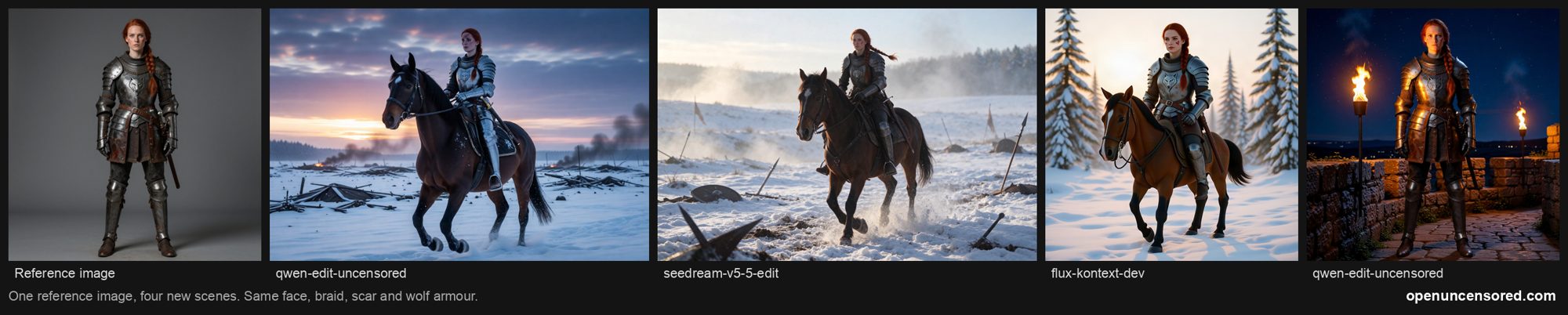
Every picture above came from one reference image through our API, with prompts like "the same woman, same face, red braid, scar and wolf-emblem armour, now riding a horse across a snowy battlefield at dawn".
The models
| Model | Best for | References | Price per image |
|---|---|---|---|
qwen-edit-uncensored |
Uncensored edits, adult content allowed | up to 3 | $0.04 |
seedream-v5-5-edit |
Keeping one character consistent across many images | up to 10 | $0.026 + $0.01 per reference |
qwen-image-3-edit |
High detail at 1K and 2K | up to 3 | $0.04 + $0.003 per reference |
flux-kontext-dev |
Precise instruction edits that leave the rest alone | up to 2 | $0.045 |
flux-2-klein-edit |
FLUX.2 quality with several references | up to 4 | $0.05 |
qwen-edit-uncensored is served by Venice, NanoGPT and Civitai, so if one host is down, the next one answers.
Prices are live on the models page.
Image to image also works on every Civitai SDXL model we serve (Juggernaut XL, PornMaster, Pony Diffusion,
Illustrious and the rest): send one picture and a prompt, and set strength between 0 (keep the picture) and 1
(redraw freely). Use it to restyle a picture. To put a character in a brand new scene, use an editing model above.
How to call it
It is OpenAI's image edit endpoint, POST /v1/images/edits, so the OpenAI SDK works unchanged:
import base64, os
from openai import OpenAI

client = OpenAI(base_url="https://openuncensored.com/api/v1", api_key=os.environ["OU_API_KEY"])

img = client.images.edit(
    model="qwen-edit-uncensored",
    image=[open("knight.png", "rb")],  # 1 to 3 reference images
    prompt="The same knight, same face and armour, now riding a horse across a snowy battlefield",
    size="1536x1024",
)
open("knight-horse.png", "wb").write(base64.b64decode(img.data[0].b64_json))
Or send JSON, with reference images as links or data URLs:
curl https://openuncensored.com/api/v1/images/edits \
  -H "Authorization: Bearer $OU_API_KEY" -H "Content-Type: application/json" \
  -d '{"model": "seedream-v5-5-edit", "prompt": "The same character in a tavern at night",
       "images": ["https://example.com/character-front.png", "https://example.com/character-side.png"]}'
Full parameters are in the API docs.
Tips for keeping a character
- Say what must stay the same. "Same face, same red braid, same scar, same armour" works much better than "the same woman".
- Give more than one angle. A front and a side view (Seedream takes up to 10) keep a character steadier than one picture.
- Change one big thing at a time. New scene, or new pose, or new outfit. Asking for all three at once drifts further.
- Reuse your best result as the next reference. Building a set of scenes from your strongest image keeps a series consistent.
In the desktop app, just ask
The OpenUncensored desktop app (Mac and Windows) has this built in. Ask its uncensored assistant something like "use knight.png and draw her sitting by a campfire", and it passes your picture to an editing model, saves the result in your folder and shows it in the chat. It can also take its own earlier pictures as references, so you can build a whole series in one conversation.
What is allowed
Adult content between adults is allowed with the uncensored models. Three things are not, and the providers refuse them: anything involving minors or anyone who looks underage, real people without their consent, and non consensual imagery. If you publish what you make, label it as AI generated.
Get a key
No account and no sign up. Buy prepaid credits at openuncensored.com/credits and use the same
ou-... key for chat, image generation and image editing.